Leverage the LinkWare Live Capabilties
With the Brady Express Labels Mobile App integration
Easy label creation with data integration
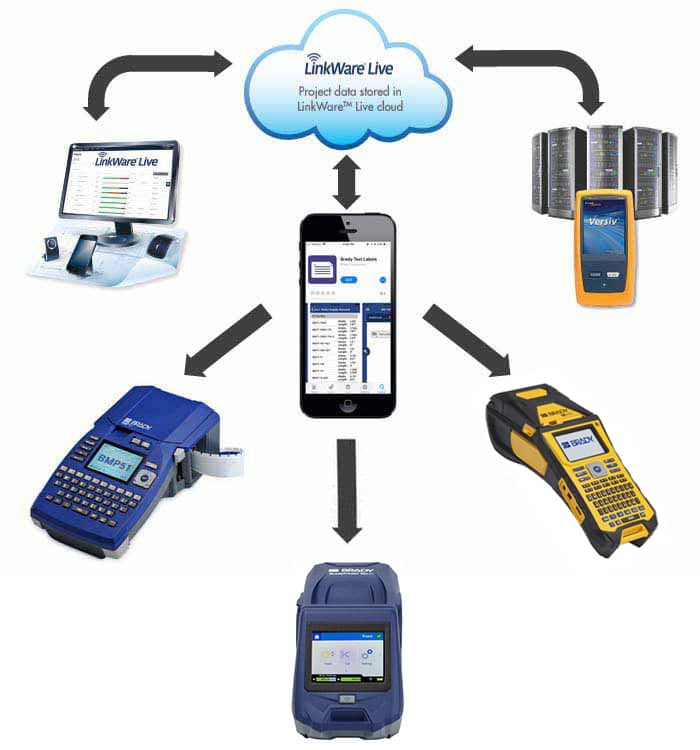
Use the Brady Express Labels Mobile App with the integrated LinkWare Live Solution from Fluke Networks® to easily print labels using the BMP51, BMP61, M510, M610 or M611 label printer. Print labels on-demand before or after completing cable testing using your Versiv testing device.
Using this integrated solution with set data, you can:
Improve Productivity

Increase Profitability

Reduce Errors

Automate process
Simplified labeling process
Follow these steps for a streamlined approach to cloud-to-label synchronization.
Step one
Download your set data from the LinkWare Live cloud using the Brady Workstation Express Labels Mobile App.
Step two
View and edit your data to meet your specifications.
Step three
Connect your mobile device to your printer via Wi-Fi or Bluetooth.
Step four
Print the set labels on your BMP51, BMP61, M510, M610 or M611 label printer.
Documentation
Access comprehensive guides and setup instructions to help you integrate the Express Labels Mobile App and LinkWare™ Live with your mobile device and printer.
Let's get started
Download the free Express Labels Mobile App and choose a Brady Printer that meets your needs.